I’ve been a happy user of SpamSieve for YEARS! But ever since this new version (V3 when we all purchased new licenses) I’ve found that on many of the “automatically marked as spam” messages will sometimes lose the SpamSieve “spam” parachute icon when I click on the message, and I’m not sure why.
Basically when I get up in the morning and check Apple Mail, I’ll see what SpamSieve caught overnight. And on a lot of the messages when I click on it to investigate (e.g. “State Farm wants to send you a free X!”) like checking URLs and such with a hover, the message will lose the SpamSieve parachute icon. I’m assuming it’s also un-marking the message as Spam as well, but I couldn’t 100% tell you that.
Any reason this happens? And any way to prevent it? 99% of what’s caught by SpamSieve is correct and I do NOT want to mark it as safe, though SpamSieve looks like it’s doing it on its own.
I’m not sure which icon you’re referring to. Could you send a screenshot?
Which version of macOS are you using?
Clicking on a message does not tell SpamSieve to do anything, but it might cause Mail to sync the junk state if it was modified on another Mac. You can see in the Log window whether the messages are being trained.
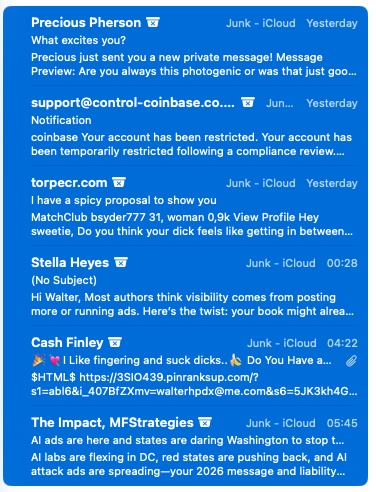
It’s not a parachute icon, it’s a bucket with an X. Screenshot attached. If I click on these to research why they’re spam, that icon usually goes away.
I’m on the latest macOS version (26.3).
I’ll check the log when I click on an email to investigate in the future.
This is the symbol that indicates that the message is marked as junk on the server. SpamSieve does set this when it classifies a message as spam. But it can also be set or cleared for other reasons (e.g. by the iCloud server junk filter). And not having the junk symbol does not mean that SpamSieve doesn’t think it’s spam. In other words, the junk symbol doesn’t really matter. I would just suggest that you check SpamSieve’s log to make sure that it shows what you expect for these messages.