I remember in some of the older versions (plug-in), spam messages were color coded based upon some rules. That way I could arrange by color and look at those that were newly caught to see if they needed to be trained as good. I’m now using 3.2.2 with the extension (no plug-in) and no matter how many times I train a particular source of spam as bad, it’s always the same color in my spam folder. Is there any way to get that color coding back? I really miss it.
The way the messages are colored hasn’t changed. What’s different is that instead of having custom rules to treat messages of different colors differently, there’s now a built-in option to move the more spammy messages to Trash instead of Junk (based on the numeric score rather than just the color). If you’re not seeing colors, make sure that Color the background according to how spammy it is is checked in the settings:
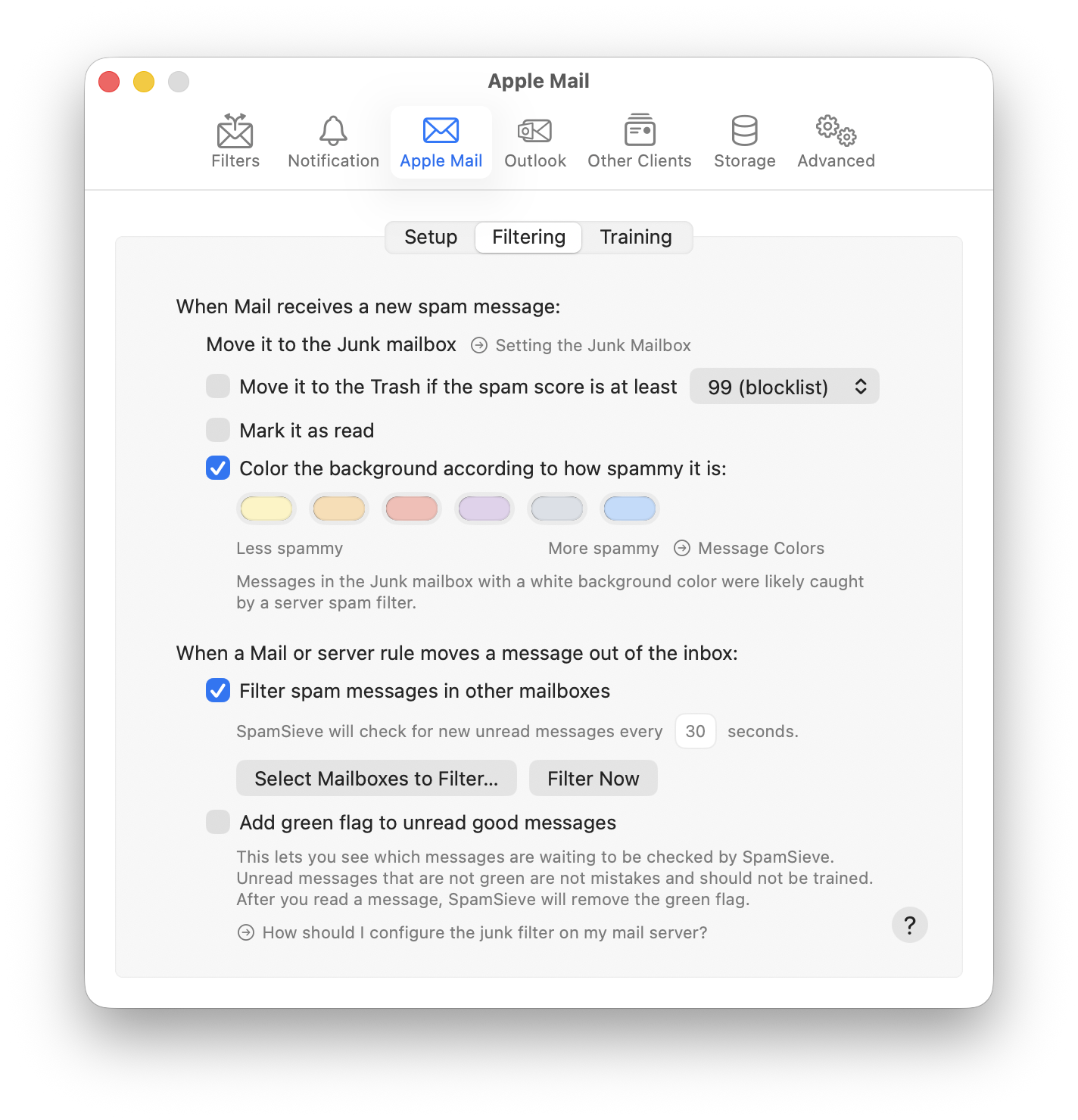
The color coding is useful but impossible to remember which color is which. It would be more useful imo if the colors were a spectrum of the same color, such as going to light pink (somewhat spammy) to bright red (very much spam), or, were ordered like the colors of the spectrum from red to violet. What do you think?
1 Like
I agree, but Mail doesn’t allow that. You can see the order of the colors in the Settings window.