Assuming successful processing on SpamSieve’s part, how often do the TrainGood & TrainSpam folders in an Gmail account get emptied?
Speaking generally, once Gmail has emptied those folders, shouldn’t the client’s Mac/iPhone/iPad show those folders as being emptied in Apple’s Mail app on those respective devices?
Client is reporting that she’ll train emails as good or as spam and they stay in those folders, in the Apple Mail app, on her Mac/iPhone/iPad - even hours later.
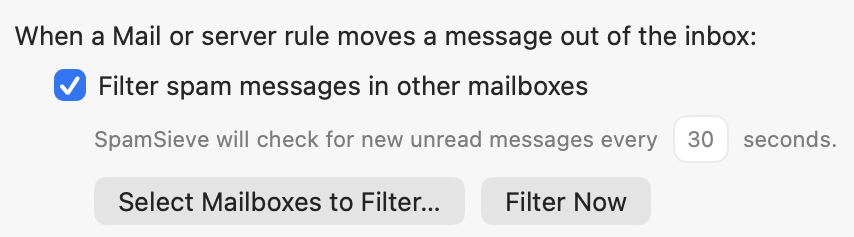
Regarding the screenshot of the settings, hers is configured the same with one minor difference: “SpamSieve will check for new unread messages every 60 seconds” on her dedicated spam-filtering Mac mini.
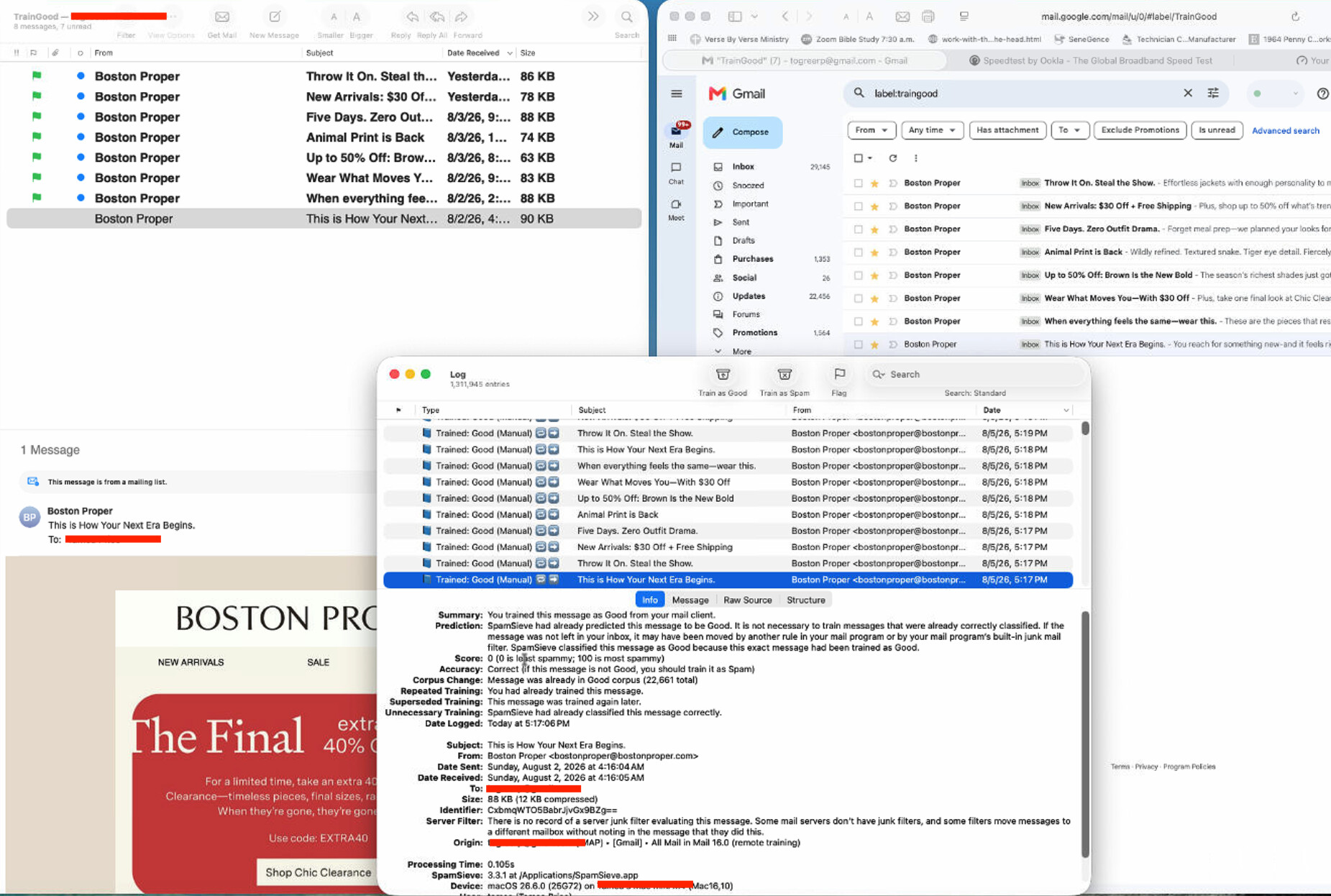
Has she confirmed when the Log window says that SpamSieve processed them? Are messages ever automatically moved out of those folders? I am in her Mac mini right now and I see, for example, that an email that was TrainedGood by SpamSieve on 8/2/2026 after 0.105 seconds of processing time is still in the TrainGood folder on both Apple’s Mail and the Gmail web interface. I have confirmed this it the case with the remaining seven (7) emails that she had TrainedGood. They have a date range from 8/2 through late 8/4. I have also spot-checked several of the emails she marked TrainSpam and the same situation exists there. I would’ve thought they would have been deleted after having been processed in short order (say, less than a hour) but it’s days later. (See attached screenshot)
Do the messages appear in those folders in Gmail?
I see the exact same messages in Apple’s Mail TrainSpam & TrainGood as are in the Gmail web interface’s TrainSpam & TrainGood.
The means that there was an earlier training of the same message.
The means that there was a later training of the same message.
It looks to me like SpamSieve is moving the messages to the inbox and then something is moving it back. Or perhaps Mail reports that the message was successfully moved but the command doesn’t make it to Gmail, so then the next time Mail syncs, it again finds the message in the old location.
Following up . . . I rebuilt the Apple Mail database as you suggested in the link above and things, for the most part, seem to be working better.
The client texted me to say that she added a few to the TrainGood folder on her iPhone and that SpamSieve trained them BUT they are still residing in the TrainGood folder. I asked her how did she know they were successfully trained as good emails and she responded that they were in her Gmail (i.e. webmail) Inbox AND they were in her Apple Mail Inbox. So why weren’t they removed from the TrainGood folder on Gmail?
Incidentally, she also said that when she adds spam emails to the TrainSpam folder, they were trained as such and removed from the TrainSpam folder on Gmail.
What should she do with the emails that remain the TrainGood folder on both Gmail and Apple Mail?
Can she confirm that the SpamSieve Log window says they were Trained: Good (Manual) and that the Origin line in the Info section of the log says (remote training)?
Do they fully move to the inbox if she drags and drops them in Mail?
I have confirmed that there were five (5) different emails still in TrainGood folder on both Apple’s Mail and Gmail. I could not find a single instance where it said "Trained: Good (Manual) or the Origin line saying (Remote Training) as you described.
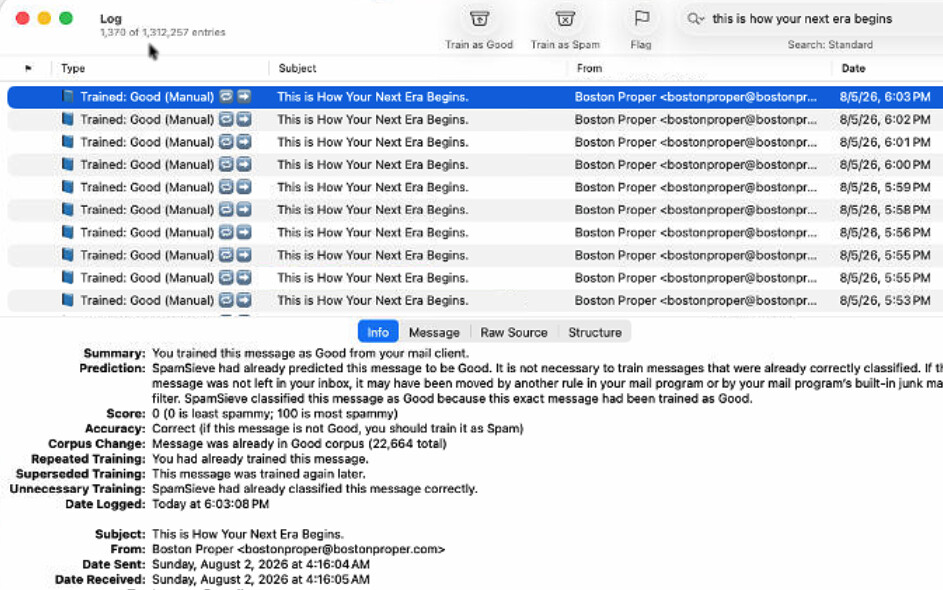
The emails seemed to be trapped in a loop of sorts in that the log shows the same email being processed and reprocessed and reprocessed repeatedly. How does that happen and how can it be prevented going forward?
I did not understand what you meant by “Do they fully move to the inbox if she drags and drops them in Mail”? as the emails already existed in Apple’s Mail in the TrainGood folder. In the interim, I’ve deleted them from Gmail’s webmail from TrainGood and that action replicated itself on the Apple Mail side as expected.
If it doesn’t say Trained: Good (Manual), what are you seeing in the log that indicates it was repeatedly processed?
I mean, the e-mails are in TrainGood, but she wants them in Inbox. So, if in fact they were trained, she could try manually moving them to Inbox by dragging and dropping them. It would be interesting to see whether that works.
In the Log, literally the same email appears, one right after another, with the same subject name, the only difference is a different time. Upon further inspection, you can see the email came in days ago and SpamSieve has been running 24/7.
 means that there was an earlier training of the same message.
 means that there was a later training of the same message.