There are some changes in SpamSieve 3.2 and a section of the manual that covers this topic.
Microsoft has extended support for Legacy Outlook for another year:
As technology evolves, so must our tools to maintain efficiency, security, and user satisfaction. Starting October 2026, the legacy Outlook for Mac client will stop working against Exchange Online mailboxes.
We recognize that some customers may be blocked from accessing certain features. If you are blocked, please contact support for assistance. In the meantime, to help mitigate this, Outlook for Mac will continue to respect admin preferences defined here.
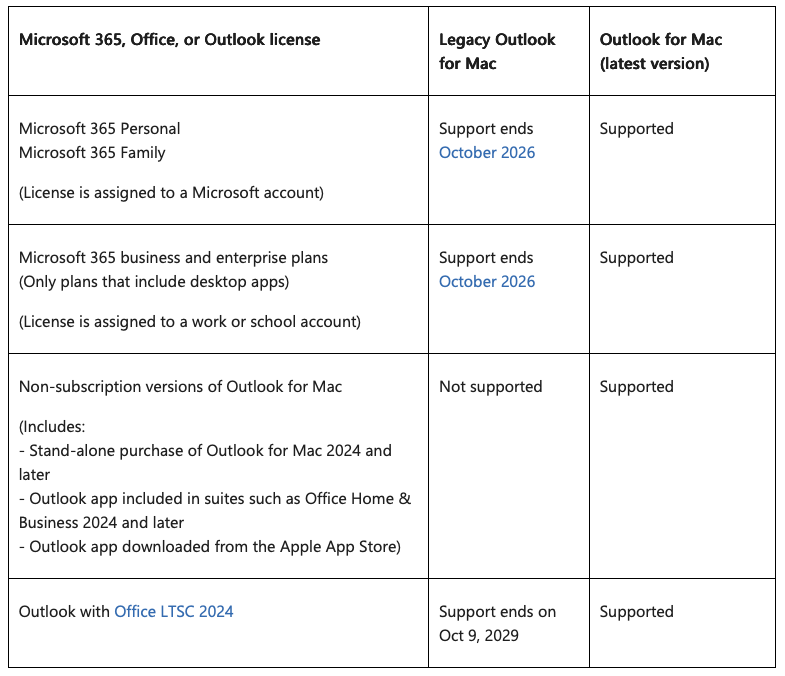
I have updated the SpamSieve manual accordingly. The summary of the current status is:
Before November 1, 2026, to keep filtering your mail with SpamSieve, you will need to either switch from Legacy Outlook to New Outlook or switch to another mail client (such as Apple Mail). As of this writing, November 2025, New Outlook does not have support for AppleScript, and thus it cannot work directly with SpamSieve.
- Microsoft plans to restore AppleScript support in December 2025. You can wait until after that to switch to New Outlook and then keep using Outlook with SpamSieve as you have been doing.
- Or you can switch now and continue to use SpamSieve by also setting up your mail accounts and SpamSieve in Apple Mail. This will also keep the spam out of your inbox in Outlook, and if you enable the Train messages in TrainSpam and TrainGood setting, you can still train SpamSieve from within Outlook.
You can choose Give Feedback from the Help menu in Outlook to ask Microsoft to prioritize support for AppleScript so that New Outlook will work directly with SpamSieve as soon as possible.