Hi.
I’m using:
- Outlook Exchange (Legacy) v16.1
- SpamSieve 3.1.3
-
I have a folder in Outlook called “InboxSpamSieve”
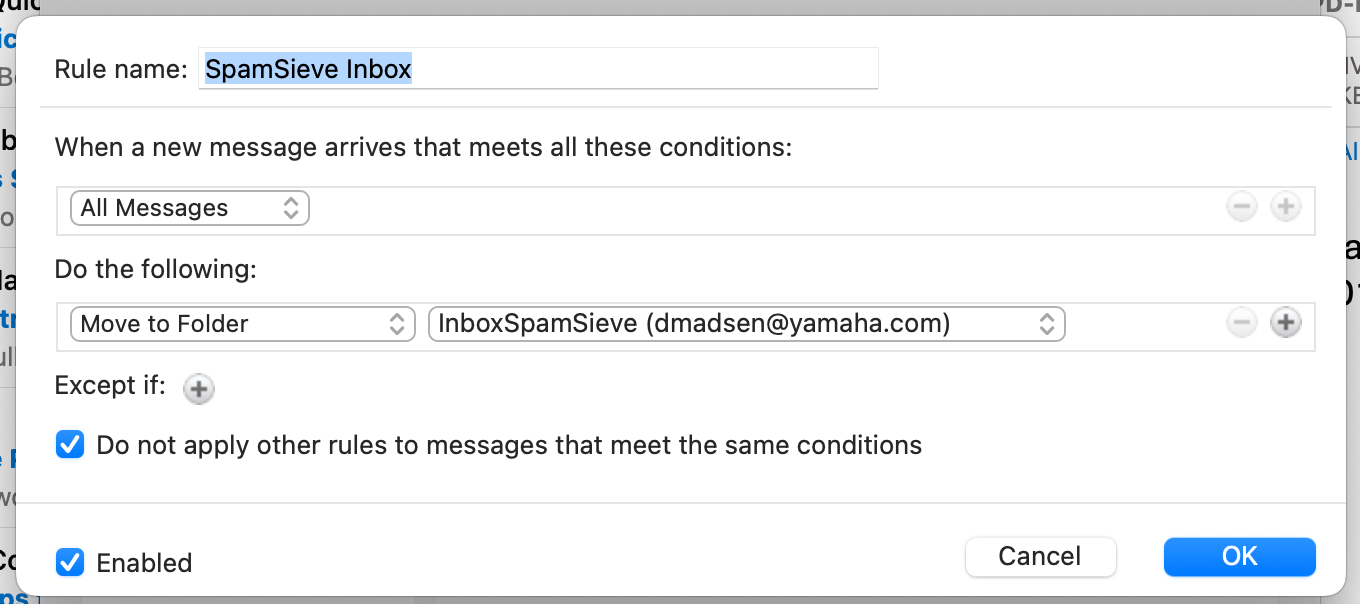
I have a Rule in Outlook set up that matches SpamSieve instructions as much as possible. But the Rule doesn’t seem to be moving emails to the InboxSpamSieve folder. for identifying as Spam.
Emails are not being moved or scanned. It also appears that I don’t have AppleScripts installed (sounds like a problem) but I don’t think that matters if the Rule isn’t moving emails into the InboxSpamSieve folder.
My Outlook Rule setup says "All messages… Move to Folder… InboxSpamSieve… "
But the SpamSieve Outlook Rule setup instructions say “When new message arrives… Folder… Is… Inbox” . I don’t seem to have “Folder… Is” as an option.
What could be going wrong here?
Where are you seeing that this is a problem? There are no AppleScripts mentioned in the Outlook setup instructions.
Could you send some screenshots showing where and how you are setting up the rule? I just confirmed that in your version of Outlook, the settings for Exchange rules do match what’s shown in the SpamSieve manual.
Sorry… never mind my AppleScripts comment.
For Rules setup please see the attached screen shot…
SpamSieve has permission to control Outlook in MacOS/Settings/PrivacySecurity
SpamSieve has permission to control Outlook in MacOS/Settings/PrivacySecurity
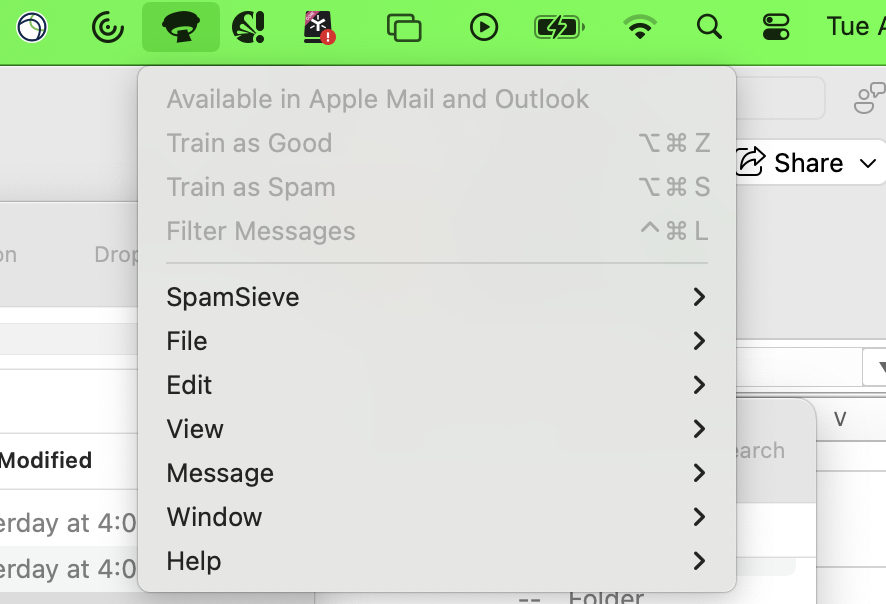
The SpamSieve drop-down menu has “Train as Spam” and “Train as Good” grayed out (not selectable). But I have an older corpus on my machine with thousands of Good and Spam messages. My perception is this shouldn’t matter if Rules don’t move emails to the InboxSpamSieve folder.
Rules options on my machine… it doesn’t seem to have “Folder… Is… Inbox” as an option like written in the instructions.
Where it says All Messages is where you should instead select Folder.
Is this rule at the top of the list?
This is because you were not in Outlook when you opened the menu. It operates on the messages selected in Outlook.
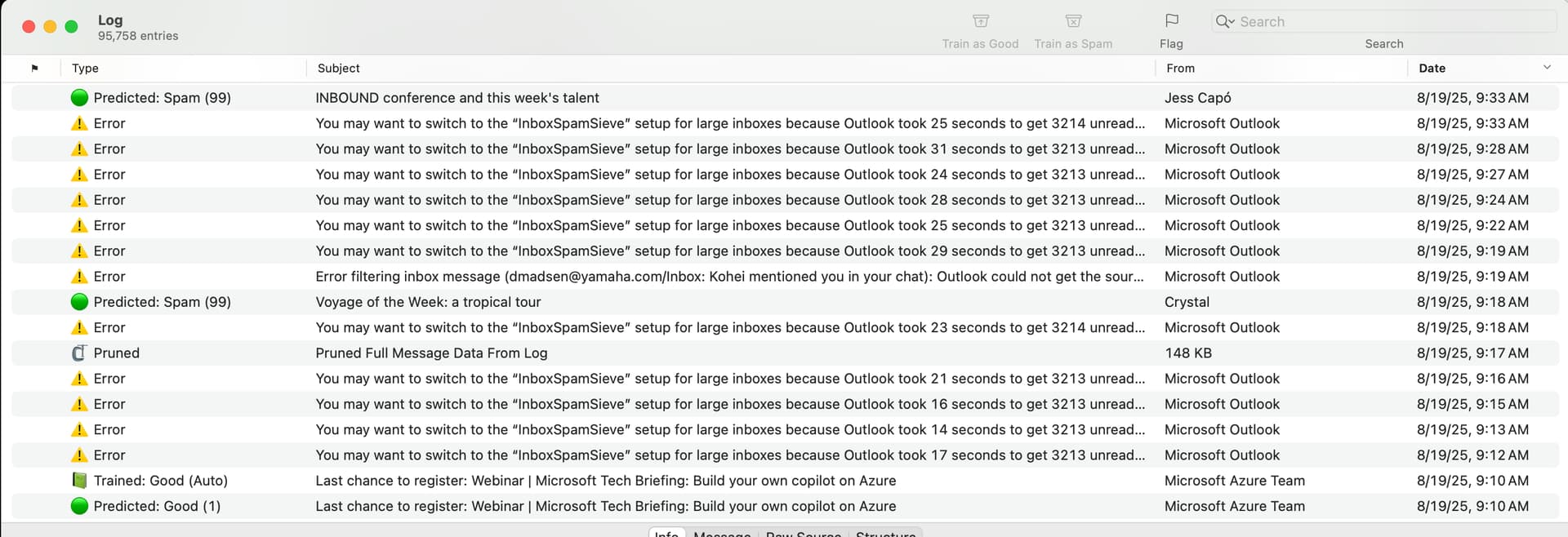
How do you know? Did you check SpamSieve’s Log window?
First of all… you’re amazing, thank you for the incredibly fast support.
I mis-informed myself looking at the log. I saw hundreds of “Large Inbox” errors and overlooked the fact that it was indeed scanning and moving.
I tried dragging a questionable email from InBox to InboxSpamSieve folder and sure enough it moved it.
So there are a lot of Spam messages staying in my inbox… but there are even more moving to Junk.
Maybe I need to re-train? Add on to my training?
Something sounds off here. The error messages in your screenshot should only happen if you don’t have Enable spam filtering for InboxSpamSieve selected in the settings. But I would have thought you’d have that selected if you were creating the InboxSpamSieve rule as described here. So it sounds like maybe you are mixing the two different setups. But then you said a message in InboxSpamSieve was filtered, so maybe you do now have Enable spam filtering for InboxSpamSieve select and this is an old screenshot?
Does the Log window show those as Predicted: Good?
Sorry for the REALLY poor timeline and forensics here… I started working on dialing in my setup yesterday. It had been many months since I trained my corpus. So you are correct, I finished steps of InboxSpamSieve yesterday. I set up the InboxSpamSieve folder years ago and depending on my company’s Outlook/Exchange versions (and laptops), the folder went in and out of use. My PERCEPTION was that for the last 8 or 9 months I hadn’t noticed the folder populating and purging automatically like it used to (but that could also have been SpamSieve just working faster/smoother than the old days… ).
Regardless, yesterday I went through some setup steps. There are thousands of emails in my Junk folder (whether they were there before yesterday or not it’s hard to say). But to your point about yesterday’s Log screenshot, the Large Inbox error was by far the most frequent error log before yesterday. In Today’s Log, that error doesn’t show at all so I may have done something right.
Since yesterday’s setup, my Inbox is spam free. 13 spam emails made it to my Junk folder successfully in the past 12 hours.(!)
But now my other Rules for auto-sorting certain emails into specific folders aren’t working. I’ll try unchecking “Do not apply other Rules…” option on the InboxSpamSieve Rule.
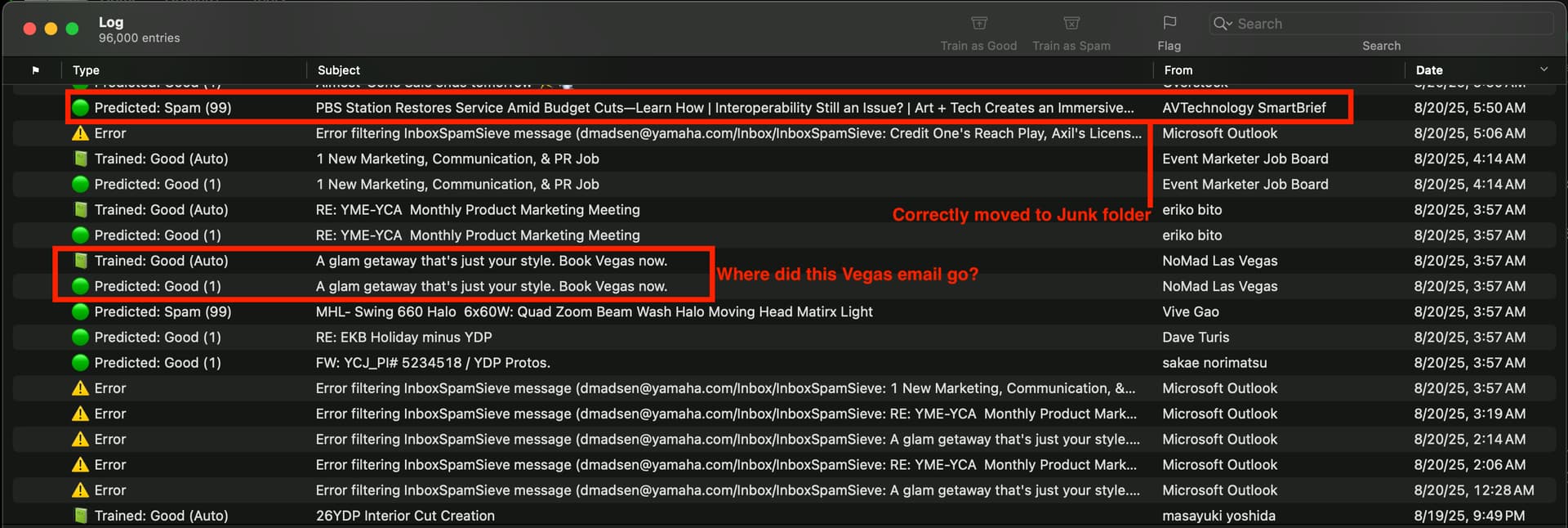
Today’s much cleaner Log shown here…
That new Log shows that a 5:50am email from AVTechnologySmartBrief was correctly predicted as Spam… and I’ve confirmed it’s in the Junk folder (yay!). Please ignore that question in the screenshot about the Vegas email… I found it… it was from a different time of day than the log.
So to answer your question, the log window shows that prior to yesterday (on 8/19), some emails were properly flagged as Spam and I’ve confirmed that those 8/19 emails were moved to the Junk folder (I’m just not certain of when they were moved).
I’m going to do some more manual training (plus uncheck “Do not apply other Rules…” on InboxSpamSieve) and see what happens.
THANK YOU FOR ALL OF YOUR HELP
I’m a true believer in this software!!!
Great!
I do not recommend that. If you want to file messages without having SpamSieve filter them, you can put those rules above the SpamSieve rule. If you do want SpamSieve to filter them, you can set up multiple InboxSpamSieve folders and rules as described here.
Or you can leave your filing rules as-is, reduce the number of messages in your inbox, and use the regular Outlook filtering setup instead of the one for large inboxes.
The date for the Predicted: Spam log entry is when they were moved.
Moving InboxSpamSieve Rule to the bottom. I won’t even tell you what happened when I unchecked “Do not apply other Rules…” as you probably already know. Switching it back on.
THANK YOU